Run the whole show from one screen, every night after.
A live song-request tool built for gigs, and built to be run entirely by you. We setup a white label URL custom to you. Fans scan a QR code, search your set list, and send a request from their own phone, no app required. You set it up once (your logo, your colors, your song list, your links) and every gig after that, just open the dashboard, play, and collect tips!

See Tipstrum in under a minute
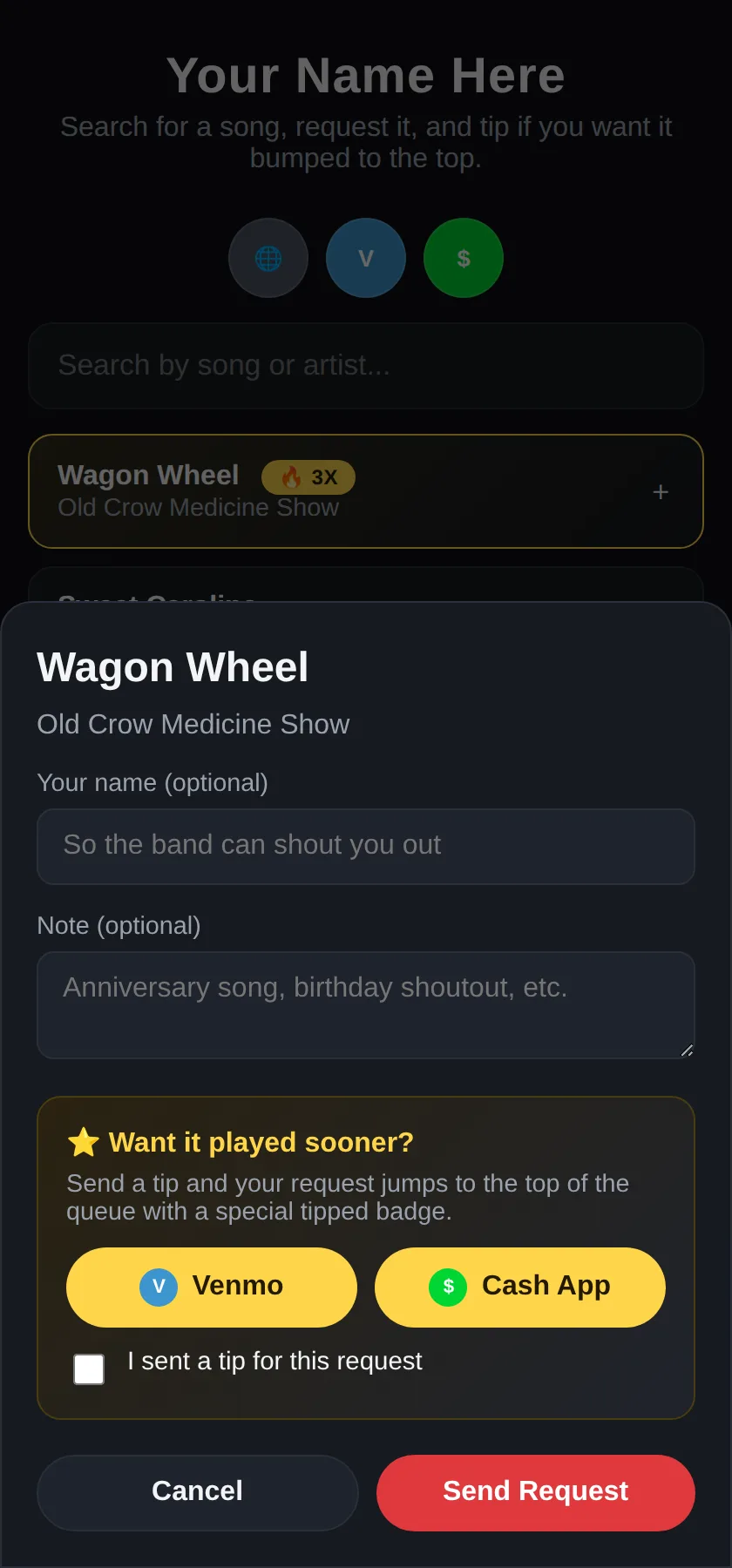
A fan scans the code, picks a song and tips to jump the line, and the request lands on the band's tablet on stage. Sound on.
Set up your song request page once, then just play
01 · SetupAdd your songs.
Paste your whole set list in one box, or load the built-in 300+ song starter list and edit from there.
Customize the branding and colors.
Upload your logo, and pick the finish, background, and color for every button on your page. No code, no designer required.
Print or share your QR code.
Generated once, it always points at your live set list. Print a table-tent-ready PDF or share it straight from your phone.
From there, every gig is just:
Fans search and tap to request.
No app, no sign-up. It opens right in their phone's browser.
A tip jumps the line.
Whatever tip platform you use (Venmo, Cash App, PayPal, and more), the request gets a gold badge and climbs to the top of the queue.
You run the queue live.
One screen (phone, tablet, or iPad) shows every request sorted by tips and popularity, with a sound and banner alert the moment one comes in.
Nothing for fans to install. It's a webpage, opened by scanning a QR code, and it works on any phone you hand it to.

No monthly recurring charges, just a one and done setup fee, starting at just $77.
Everything you need take tips and requests, live
Live song request queue
Auto-sorted by tips and popularity. Drag any card to override the order by hand.
Tip-to-skip-the-line
The incentive to tip is built into the request itself, not a jar nobody notices.
A digital tip jar for Venmo, Cash App, PayPal and more
Use whatever tip platform you already have, in any mix.
Add your own picks to the queue
Drop a song straight in from the Dashboard without waiting for a fan to request it.
A song request QR code that's always ready
On screen instantly, or download a print-ready PDF (table tent, Letter, or A4) at a true 600 DPI, or share either one straight from your phone.
Full set list control
Add, edit, and drag to reorder your songs. Anything requested more than once automatically floats to the top for fans to see.
Make your request and tip page completely yours
Every part of how this looks and works is yours to set, right from the admin portal. No code, no waiting on a developer.
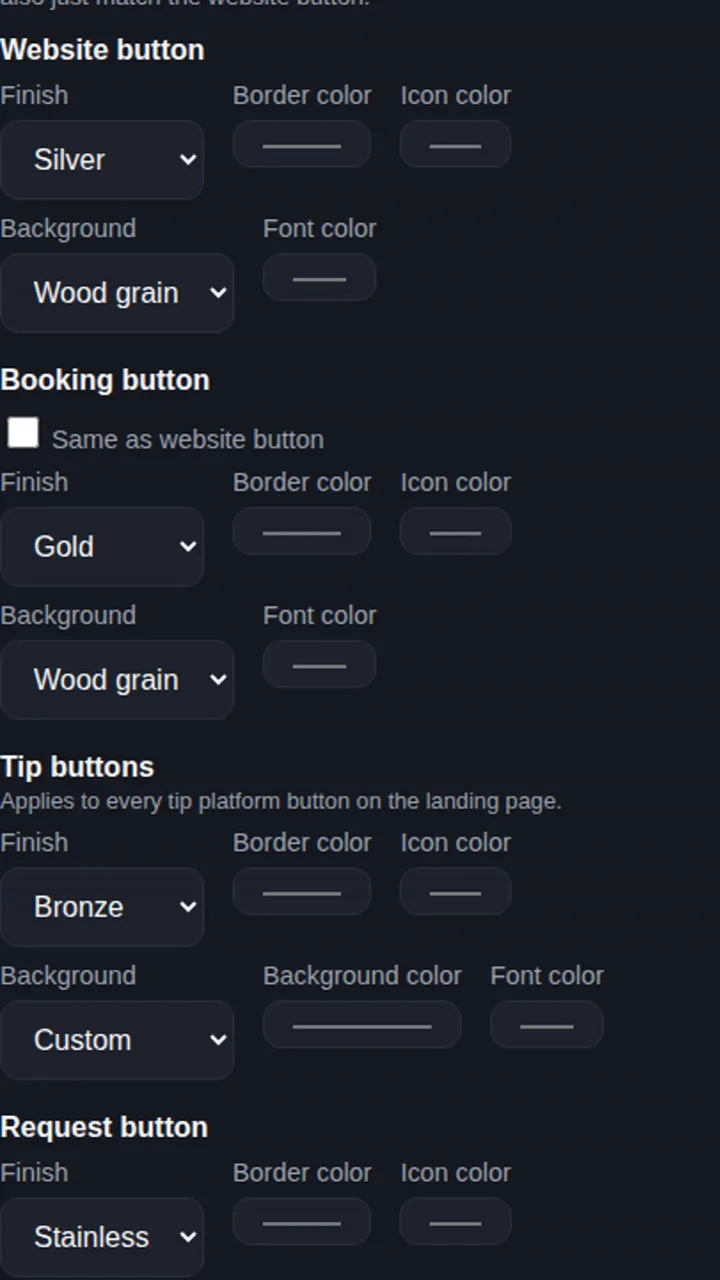
Every button, your colors.
Pick a metal finish (gold, silver, stainless, or bronze) plus an independent background (wood grain, a matching metal, or any custom color) and font color, separately for your Website, Booking, Tip, and Request buttons. Have the Booking button just match the Website button if you'd rather not think about it twice.
Your logo, your way.
Upload a photo or graphic and it's live on your landing page in seconds. No logo yet? We'll design one for you as part of getting you set up.
Decide exactly what's requestable.
Tag songs Holiday, Tier 1, or Tier 2 and switch any combination on or off from Settings. Run a holiday-only set, spotlight your originals, or open the whole catalog. Put a single song On Hold and it disappears from requests without leaving your set list or its place in your set order.
Seasonal themes, one click.
Flickering jack-o-lanterns for Halloween, twinkling lights and a wreath for Christmas, falling gold confetti for New Year's. Purely cosmetic, so switch back to normal whenever you want.
Pause requests, your words.
Turn requests off without hiding your set list, and write your own message for when you do. The switch lives on both the Dashboard and Settings, so you're never far from it.
Only your band gets in.
The admin portal is gated by Google sign-in to the email addresses you choose. Nobody else can touch your songs, settings, or live queue.
Why bands, solo musicians and DJs use Tipstrum
- More tips, not fewer.
- Tipping reads as "pay to skip the line," not a jar nobody looks at between sets.
- No more shouted requests mid-song.
- Fans self-serve from their phone instead of flagging you down on break.
- No more shouted requests mid-song.
- Fans self-serve from their phone instead of flagging you down on break.
- Read the room in real time.
- Watch requests stack up live instead of guessing what the crowd wants next.
- Look like the pro you are.
- A branded landing page and a live queue on the iPad, not a paper list taped to an amp.
Song request and tip jar Q&A
Do fans need to download an app?
No. Fans scan your QR code and Tipstrum opens in their phone's browser. No app, no sign-up, and it works on any phone. (Though, if you want a custom app for your band or DJ sets in the App Store, we can do that too!)
Which tip apps does it work with?
Each and every method you already use: Venmo, Cash App, PayPal and more, in any mix. A tip gives the request a gold badge and moves it up the queue. Use something not in the app? We'll add it for free.
Is it just for bands, or for DJs too?
Anyone who takes requests: solo musicians, duos, cover bands, wedding bands and DJs. You load your own song list, so it fits any set.
How do I show the QR code at a gig?
Put it on screen, share it from your phone, or print a ready-made PDF (table tent, Letter or A4) at a true 600 DPI right from the app. We also can provide custom signage or banners shipped to you.
What does "whitelabel" mean?
When you purchase the app, we create a custom URL with your name, such as 'thestonekickers.web.app' or 'djkitsune-stlouis.web.app', so the URL your audience goes to is branded, giving your gigs a more professional, polished feel.
How is Tipstrum different from other tip and request QR code apps?
Honestly, just a few small things. We build you a custom URL, and you have control to upload your logo, change the look of the public-facing landing page, and make it your own. We also change a one time fee instead of a monthly, (though we do have monthly plans starting at $9/mo if you prefer.) Pay once, and it's yours forever. We also can customize the app for your needs, add holiday themes, or build you a custom version with extra features, such as gig schedules and online booking for your band. Unlike the other QR Request and Tip providers, we'll work with you to make sure you get exactly what you want.
No server bill eating into your tips. At a normal night's traffic, the app runs entirely inside the free tier of its hosting platform, with no recurring monthly fees. Just one and done, whitelabelled for your band or DJ name with a custom URL to match.
Ready To Go: US$77
one time, no recurring fees
Ready to take song requests and tips at your next gig?
Set it up once tonight (your logo, your colors, your set list) and you're ready for every gig after. Get your QR code up and start taking song requests and tips.